
Voice agent setup
Get call alerts on your phone.
Set up Pushover to get a notification on your phone after your voice agent takes a call.
-
Install Pushover
Pushover is free for 30 days, then $4.99 USD once per platform for an individual license. You pay Pushover, not SAMEpage.
-
Create your account
Open Pushover and choose the option to create an account. Enter your email and choose a password just for Pushover. If Pushover asks you to verify your email, open its email and follow the link.
Back in Pushover, name your device (for example, My iPhone) and finish registering it. Tap Allow when your phone asks about notifications. A welcome message in Pushover confirms the phone is registered. -
Send us your User Key
In Pushover, tap the gear icon in the upper-right corner. In Settings, find and copy User Key.
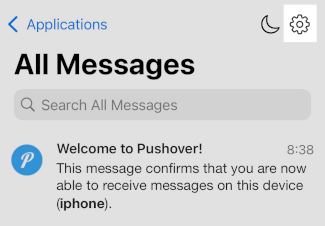
iPhone screenshot from Pushover. On Android, look for Settings in the app menu if you don’t see a gear. User Key••••••••••••••••••••••••••••••Example onlyCan’t find it in the app? Sign into your Pushover dashboard and look for Your User Key.
Open the personal setup link SAMEpage sent you to securely submit your User Key. No password or API token is needed.
You’re done once you send your key
Let your SAMEpage contact know you submitted it, without including the key in your message. We’ll handle the rest.
Retrieve the User Key
Open the key only when you’re ready to copy it into the private Make connection.